8 Best Gutenberg Gallery Block Plugins for WordPress

Best Gutenberg Gallery Block Plugins for WordPress

Gutenberg is the default editor for WordPress. It allows you to create various content using blocks like paragraphs, images, buttons, etc. One useful block of them is the gallery block, with which you can display multiple images together in a clean layout.

However, the default gallery block is quite basic. You can’t create complex layouts with it. But with a Gutenberg gallery block plugin, you can create stylish and customizable image galleries. They offer more layouts, design options, hover effects, and responsiveness than the default block.

You can create beautiful image grids, sliders, masonry galleries, and more with just a few clicks. In this article, we’ll list and discuss the best Gutenberg gallery block plugins for WordPress so you can choose the right one for your website. Get started!

There are several things you must consider when selecting a gallery block plugin so you can make the best of it.

Take a look at them below.

Layout Variety

Look for plugins that offer multiple gallery layouts, like grid, masonry, justified, and slider. More layout options mean you can better match your gallery style with your website design.

Mobile Responsiveness

Performance Optimization

Lightbox and Zoom Features

Integration with Media Library

You will find lots of gallery plugins online for WordPress. But not all of them are Gutenberg-friendly. So, in this section, we’ll list and discuss some of the best Gutenberg gallery block plugins, including their key features and pros & cons. Keep reading!

1. Galleryberg
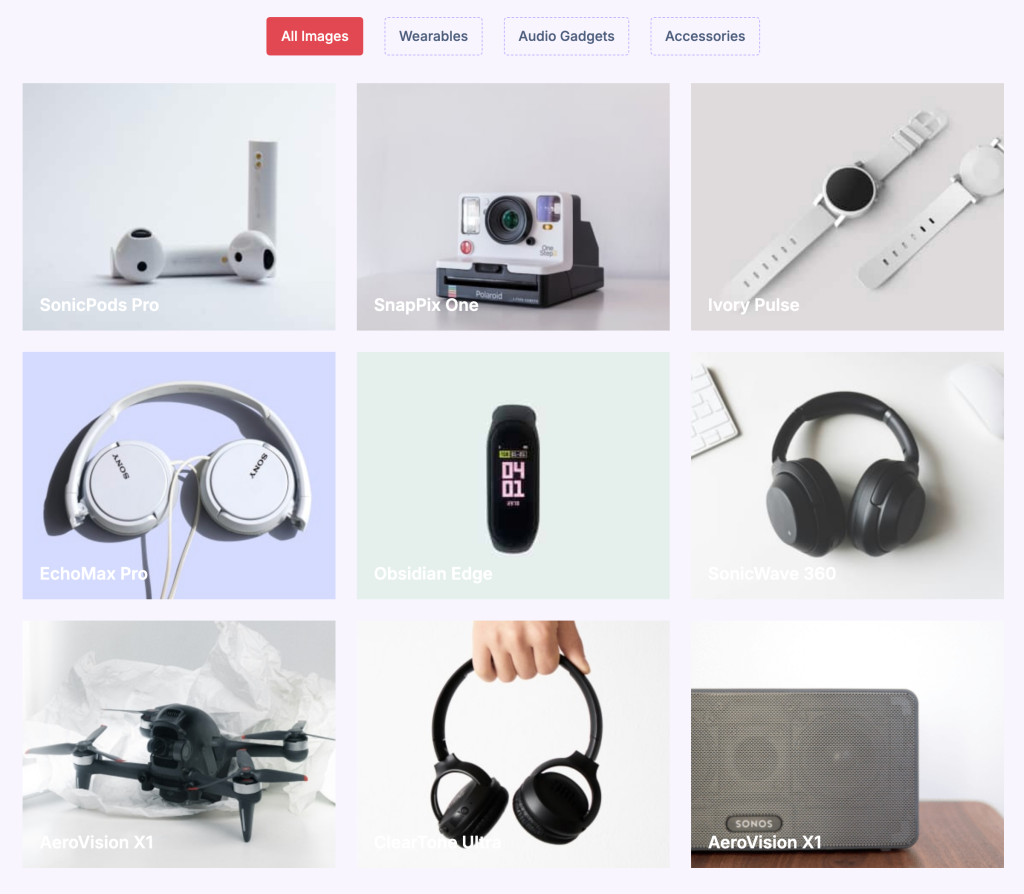
Galleryberg is an intuitive and user-friendly Gutenberg gallery block plugin designed to effortlessly create attractive and professional-looking image galleries. With Galleryberg, you can easily display images in multiple stylish layouts such as Masonry, Tiles, Justified, and Square. This flexibility ensures your galleries seamlessly blend with your website’s aesthetic.

This plugin also comes with a built-in responsive lightbox, enhancing user interaction by allowing visitors to view images in full size directly on your page, complete with smooth zooming and navigation features. You can customize everything from image spacing and borders to caption display options, making it easy to achieve your desired visual impact.

Galleryberg prioritizes performance optimization, utilizing efficient server-side rendering for fast loading times, even when displaying numerous high-quality images. Its clean and lightweight code ensures your galleries load quickly and won’t slow down your site.

If you’re looking for a powerful yet simple gallery solution that offers comprehensive customization options without overwhelming complexity, Galleryberg is an excellent choice.

Key Features of Galleryberg:

Multiple Gallery Layouts: Galleryberg offers various elegant layouts such as tiles, square, masonry, and justified to beautifully showcase your images.

Responsive Design: All gallery layouts are fully responsive, ensuring they look perfect on desktops, tablets, and smartphones. You can also adjust the number of columns for optimal display.

Advanced Lightbox: Enjoy a seamless, professional lightbox experience with smooth zoom effects, keyboard navigation, touch gestures, and loop functionality for easy browsing.

Detailed Image Customization: Each image can be individually customized with borders, captions, and aspect ratios. You can also apply duotone filters and adjust spacing between images.

Optimized Performance: The plugin uses server-side rendering to ensure rapid page loads, helping maintain the performance and speed of your site.

Accessibility Ready: Galleryberg includes comprehensive ARIA labeling and keyboard navigation support, making your galleries accessible to all users.

Pros

  • User-friendly interface suitable for beginners and professionals
  • Lightweight and performance-optimized
  • Comprehensive customization capabilities

Cons

  • Limited advanced filtering options
  • Additional animation effects could be enhanced

Pricing of Galleryberg:

Galleryberg is available entirely for free from the WordPress plugin repository.

2. Essential Blocks

Essential Blocks

Essential Blocks is another versatile plugin that enriches the default Gutenberg block library with 60+ custom blocks. The abundance of custom block collections makes it an ideal option for creating captivating blog posts and pages.

The plugin offers two gallery blocks – NFT Gallery and Filterable Gallery blocks. Using the NFT Gallery block, you can display images of Non-Fungible Tokens, like artworks, paintings, animations, illustrations, etc.

The Filterable Gallery block lets you create image galleries where users can filter images by category. It adds filter buttons above the gallery so visitors can quickly sort and view images based on topics or tags.

Versatile Media Support: The NFT Gallery block can handle various media files, like images, videos, 3D models, and beyond.

Dynamic Filtering: The Filterable Gallery allows users to sort the gallery content by tags, categories, and other criteria.

Lightbox Preview: Each image can be viewed in full-screen by clicking on it for better viewing.

Customize Gap and Columns: Essential Blocks allow you to customize the gap between all rows and the number of columns.

Drag & Rearrange: After adding images to the gallery, you can rearrange their order just by dragging them in the editor.

Pros

  • Versatile layouts in both gallery blocks
  • Easy to customize fonts, colors, spacing, etc.
  • Allows adding captions and descriptions
  • Integrates WooCommerce

Cons

  • Many advanced features aren’t available for free
  • The customization interface is a bit overwhelming

Pricing of Essential Blocks

Essential Blocks has a free version available. Its premium version starts from $49/year with a 14-day money-back guarantee.

NextGEN Gallery

NextGEN Gallery has been one of the most popular gallery-building plugins since 2007. It’s simple but powerful enough for professional photographers and artists to showcase their artworks in compelling layouts. Not only can you upload bulk images but also import metadata, rearrange or delete images, and create unlimited galleries or albums.

The free version includes three gallery styles (slideshow, thumbnail, and image browser) and two album layouts (compact and extended), each with rich options for size, layout, lightbox effects, and transitions. If you need more, the Pro version will open up many new opportunities for you.

Easy Photo Management: It allows you to upload many photos at once using drag-and-drop or even ZIP files. You can add, delete, rearrange, and organize photos into galleries and albums easily.

eCommerce Integration: With NextGEN Pro, you can sell your photos or galleries online. It works with Stripe and PayPal, includes print fulfillment, and offers tools like auto tax calculation, discount coupons, and digital downloads.

Lightroom Integration: It’s easy to sync your photo galleries directly from Adobe Lightroom, so you don’t have to update your website after every change manually.

Animations and Themes: There are 25+ animations and 84+ gallery themes to make your galleries look attractive and unique.

Watermarking and Image Protection: You can add watermarks to protect your work and disable right-click or drag-and-drop to prevent image stealing.

Social Sharing and Deep Linking: Images are ready for sharing on social media platforms. You can also link directly to a single image in a gallery (deep linking).

Pros

  • Comprehensive features
  • Photographer-friendly
  • Top-notch gallery optimization
  • Active support and documentation

Cons

  • Steep learning curve for advanced features
  • Newbies may find the UI a bit complex

NextGEN Gallery has a free version available. Its premium version starts from $139/year with a 14-day refund policy.

4. FooGallery

FooGallery

FooGallery is another user-friendly WordPress gallery plugin. It comes with seven built-in gallery templates, including Justified Grid, Masonry, Carousel, and Simple Portfolio. These layouts are fully responsive, retina-ready, and include built-in lightbox effects.

You can easily customize thumbnail sizes, borders, shadows, hover effects, and more. The plugin is optimized for fast performance with lazy loading and minimal layout shifts. It also supports SEO tools like Yoast, Rank Math, and AIOSEO.

Key features of FooGallery

Built-in Lightbox: This lets users click on an image to view it in a larger size with smooth effects. You can also change lightbox colors and transitions, add fullscreen mode, show or hide captions easily, and more.

Easy Customization: It gives you full control over how your gallery looks. You can adjust thumbnail size, spacing, borders, shadows, rounded corners, hover effects, different loading icons, and animation effects.

Performance Focus: This plugin is built to be fast and lightweight. It includes lazy loading for faster page speed, clean-optimized code, simple pagination, and minimal layout shifting for better user experience.

Albums Support: FooGallery allows you to create albums, which are collections of multiple galleries. Each album offers responsive layouts and stack-style album views.

Developer-Friendly: Custom CSS support, gallery blueprints, white labeling, import/export between sites, and support for WordPress multisite are great for developers.

Pros

  • Optimized for performance
  • SEO-friendly
  • WooCommerce integration
  • Video support

Cons

  • Many exciting features aren’t in the free version
  • Lacks site-wide search and gallery sorting options

Pricing of FooGallery

FooGallery has a free version available. Its premium version starts from $33.99/year with a 30-day refund policy.

5. Kadence Blocks

Kadence Blocks

Kadence Blocks is a multi-purpose Gutenberg block plugin with a collection of 25+ custom blocks. So, you can curate different types of content on your site using them. Besides, the plugin offers over 100 pre-built templates for various sections and layouts.

The gallery block of the plugin stands out with its five distinct layouts, like masonry, grid, carousel, slider, and fluid carousel. So, you have the flexibility to choose the layout that seems compelling for presenting your images and photographic content.

Multiple Layout Options: As already said, the plugin supports five distinct gallery layouts. You can choose the one that matches your content and web design needs.

Lightbox Integration: You can enable a built-in lightbox for full-screen image viewing. It also allows linking images to media files or custom URLs for enhanced user interaction.

Customizable Captions: Offers detailed control over caption font size, color, font family, and positioning (hover, bottom, or below image).

Image Size Optimization: It lets you specify the thumbnail size of your images. It can reduce file size and improve page loading speed while maintaining responsiveness.

Advanced Row Layout Support: It integrates with Kadence’s Row Layout Block to create complex and multi-column gallery layouts with precise spacing and alignment.

Pros

  • Extremely customizable
  • Optimized for performance
  • Integrates with Kadence Theme
  • The Pro version enables dynamic content creation

Cons

  • Limited templates in the free version
  • Lots of options may overwhelm beginners

Pricing of Kadence Blocks

Kadence Blocks has a free version available. Its premium version comes as a package with the Kadence theme and plugin, not the plugin alone. The package starts from $69/year with a 30-day refund policy.

SimpLy Gallery Blocks

SimpLy Gallery Blocks is a dedicated gallery builder plugin. It comes with a suite of many responsive gallery blocks, including Masonry, Justified, Grid, Slider, and Carousel. It supports gallery creation for presenting images, videos, and audio files.

Its drag-and-drop interface simplifies the process of creating and customizing galleries. You can also adjust settings like column numbers, thumbnail sizes, background color, and many more options.

Key features of the SimpLy Gallery Blocks plugin:

Multiple Gallery Types: The plugin provides a variety of gallery blocks, including Masonry, Justified, Grid, Slider, and Carousel.

AJAX and Performance Optimization: The plugin uses AJAX for faster page loading. It’s designed to minimize memory usage and maintain site speed.

Filtering Options: The plugin allows the creation of dynamic Vimeo video galleries and tag-based filtering while maintaining minimal impact on page speed.

SimpLy Lightbox: Its lightbox feature is highly customizable. It supports gesture navigation, scrolling, autoplay slideshows, and deep linking for tags.

Regular Updates and Compatibility: Frequent updates ensure compatibility with the latest WordPress versions, fix bugs and improve performance.

Pros

  • User-friendly interface
  • SEO integration
  • Supports customization
  • No annoying hovers

Cons

  • Limitations in the lightbox
  • Often creates broken links

SimpLy Gallery Blocks has a free version available. Its premium version starts from $24.99/year with a 7-day refund policy.

7. Spectra

Spectra

Spectra has been developed and is maintained by Brainstorm Force, who are the same team behind the development of the famous Astra theme. It currently has 35+ custom blocks, including a feature-rich gallery block.

With the gallery block, you can create grid and masonry layouts to present your image content. The block allows precise control over spacing, image sizes, and captions to help you align the gallery with your site’s aesthetic.

Spectra Reviews and Ratings

Lightbox Support: Comes with a lightbox feature that lets visitors view images in a larger popup, with easy settings to adjust how it looks and works.

Grid and Masonry Layouts: Offers grid and masonry layout options for flexibly arranging images, which are ideal for portfolios or product showcases.

Hover Effects and Animations: Provides hover effects and animations to add dynamic visual appeal, configurable without coding.

Responsive Customization: Allows you to fine-tune adjustments for spacing, image sizes, and column counts across desktop, tablet, and mobile devices.

Integration with Container Block: The Container block provides advanced layout control options, and the gallery block has integration with it.

Caption Styling: This enables you to customize the caption fonts, colors, and alignment to maintain brand consistency.

Pros

  • Lightweight & Fast
  • Huge customization options
  • Intuitive interface

Cons

  • Takes time in the learning curve
  • Fewer features compared to the Kadence Blocks

Pricing of Spectra

Spectra has a free version available. Its premium version starts from $59/year with a 14-day refund policy.

8. Nexter Blocks

Nexter Blocks

Nexter Blocks is a relatively new Gutenberg block plugin with 90+ custom blocks. Although it’s new, you can count it as a promising plugin because it has the ability to create compelling layouts to present different types of content on your web posts and pages.

Among them, Image & Video Galley/Carousels is the block by which you can create galleries on your website. Besides, the plugin comes with 1000+ readymade templates to instantly prepare necessary layouts for your content presentation.

Four Customizable Layouts: Nexter Blocks supports Masonry, Grid, Metro, and Carousel gallery layouts.

Responsive Column Manager: It offers device-specific column adjustments. You can set different column counts for desktop (e.g., 3 columns), tablet (e.g., 2 columns), and mobile (e.g., 1 column).

Category Filters and Navigation: Nexter Blocks enables category-based filtering so visitors can sort gallery content with a single click. This feature is combined with navigation arrows, dots, and center mode for highlighting active slides.

Extensive Customization Options: It offers fine-tuned controls for image captions, custom links, spacing, borders, hover effects, slide speed, autoplay, etc.

Lightbox with Zoom and Fullscreen: It includes a Fancybox-powered lightbox with zoom and fullscreen capabilities for enhancing the image viewing experience.

Pros

  • Responsive design
  • Diverse layouts
  • Module Structure
  • Free to use

Cons

  • May cause conflict in managing large galleries
  • Limited advanced features

Pricing of Nexter Blocks

Nexter Blocks has a free version available. Its premium version starts from $59/year with a 60-day refund policy.

Conclusion

Choosing the right Gutenberg gallery block plugin can make a big difference in how you present images and art graphics. Some gallery plugins are capable of showing images only. But some other plugins allow advanced filtering. Besides, integration with WooCommerce can enable you to showcase your product photos on posts and pages.

Now, it’s your time to choose the plugin that is able to meet your demand within your budget. However, to get the best out of galleries, always optimize your images before uploading them to reduce file size without losing quality. Use lazy loading and simple pagination to prevent long loading times.

Choose a plugin that offers good performance settings and avoid using too many animations or effects that can slow down your site. If you have any questions, mention them in the comment box below.

Which Gallery block plugin are you going to use?

Comments

Leave a Reply

Your email address will not be published. Required fields are marked *